Background - reading UK National Cyber Security Centre seeing they do not address lack of literacy in reading domains
A relative’s details got stolen in a data breach. So I looked at National Cyber Security Centre guidance on scam messages and noticed a gap: they don’t guide people on reading domains properly.
Note/disclaimer: besides National Rail website address (nationalrail.co.uk) the URLs/email addresses used as examples - in the images or in text like this - here are for example purposes only and any resemblance to real URLs or email addresses is purely coincidental.
How to read a domain, an email address and a website address
How to read a domain
Read the domain left to right - and dots separate it into parts.
In an email address the domain is the part to the right of the @ symbol - but inside any angle brackets (< and >) if angle brackets are present. In the email address ceo@example.com: example.com is the domain.
In a website address starting http or https the domain is between the :// and the first forward slash after that (or the end if no forward slash after :// at start).
If there is no http:// or https:// at the start of the website address then the domain is to the left of the first forward slash. It should be read from right to left - and dots (periods) separate the parts - the most important parts that a scammer can manipulate the least are to the right and the parts a scammer can influence the most are to the left.
In the website address: https://www.example.co.uk the part to read for the domain is www.example.co.uk and because one reads it right to left it is built up as:
uk(then there is a dot or period indicating a different part),- then
coto make what we have read so far asco.uk(so we know this is a.co.uk), - then
exampleto makeexample.co.uk- this is the main domain name, - and then finally the
wwwis the subdomain - something that whoever owns the main domain name can set as they wish. Note that if the main domain is of a company like a website creation company it may be a client/user of that company filling out a form, and not anyone particular at the company that is responsible for the use of particular subdomain - e.g. you may be reading this atbyjosh.github.ioand whilegithub.iois the GitHub domain it is I, not anyone at GitHub, who determined that thebyjoshwould be used as the subdomain - the use ofbyjoshas subdomain is something permitted by GitHub systems, rather than anyone there approving the use ofbyjoshspecifically, - and all together
www.example.co.ukwould be called the fully qualified domain name.
The important thing is if you read the domain right to left (the opposite of the English language in general) you understand what parts of the domain are most important and least subject to the whim of a scammer.
The .uk and .co.uk for instance are set at the country level as a valid country code top level domain (here for the UK) and second-level domains for the specific country (the .co part of .co.uk) - a scammer cannot make those up.
Then comes the domain - here example in example.co.uk and that is at the discretion of the personal registering the domain. That discretion can mean that people will use tricks like mixing Cyrillic characters like a lower case Cyrillic a so that e.g. a well known domain containing the word mart appears to be used but in fact the domain has normal Latin m, Cyrillic a, normal Latin r, normal Latin t as part of the domain instead of the expected mart in normal Latin alphabet (see e.g. this USA Today article on deceptive use of Cyrillic characters in domains).
As will be discussed below the subdomain is at the whim of the scammer - and may be independent of a trustworthy domain.
Read an email address
Here is an example email address from something that looks like a spam email.
ROLLS-ROYCE MOTOR CARS LIMITED <customer.information.bmw.uk@gmail.com>
It has 4 key parts:
- the display name - is what is outside the angle brackets (
<&>) - here it isROLLS-ROYCE MOTOR CARS LIMITED- this is what your webmail or email app on your phone may show you and bears no relation to the actual email address. In your email settings you can change your display name to almost any mix of words - we will come back to this. - the actual email address - inside the angle brackets (here:
customer.information.bmw.uk@gmail.com) - the domain (here
gmail.com). Thanks to efforts to filter out spam emails the ones that reach your inbox probably have a real domain used - so reading it is important (right to left - we will come back to this below). - the local part - before the @ symbol in the email address (here:
customer.information.bmw.uk) - you set this when creating/signing up to an email and the constraint is it not being taken for the domain. Beware here of tricks like capital I in place of lowercase L or Cyrillic character tricks mentioned - this is most likely if someone wanted to target you personally via the email of someone you know - e.g. if your boss or son is called hasianin their email - being called Ian - maybe the Cyrillicawould allow a convincing fake email from a real address that looks like the trusted email address but has a Cyrillicain a key position.
One can find this kind of email address in two ways.
- Hovering with a mouse over the display name of email address in webmail -
-
Opening the email - not recommended if scam or spam email - and at the top of the message is the “From” field containing the email address (depending your email program/app or webmail you may need to to various things to see the actual address instead of the display name)
In the following image there is the little box - a tooltip - showing the actual email address is
example-address@example.comthat comes up when hovering the mouse point over the display name ofExample Companyfound above the subject line of the email about a package being with the courier.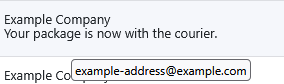
Example: what we know from reading
ROLLS-ROYCE MOTOR CARS LIMITED <customer.information.bmw.uk@gmail.com>So knowing how to read a domain and email address we can say for
ROLLS-ROYCE MOTOR CARS LIMITED <customer.information.bmw.uk@gmail.com>that:- this email is coming from a gmail.com account (the well known free email service from Google/Alphabet) - which is suspicious for prestigious brands - this is the key signal that it is almost certainly spam & is an obvious signal for someone who knows how to read domains and email addresses.
- we can also say the display name
ROLLS-ROYCE MOTOR CARS LIMITEDdoes not match the local part of the email addresscustomer.information.bmw.uk- here the important thing here for scam spotting is that neither brand would use a free gmail.com email for official communications - but in a more sophisticated attack either you might be sent an email from someone you know and trust who does use a gmail.com but the scammer might match the display name but not the local part. E.g. if your daughter isjane.example.smith@gmail.comwith a display name of “Jane E Smith” the scammer might create a gmail.com email with a different local part (maybe different but similar such asjaneexample.smith@gmail.comor maybe completely different likesmart-hotel-bathrooms@gmail.com) and match the display name of “Jane E Smith”. Where the display name matches that of a trusted email but the local part of the email address is in fact different from the trusted email the ability to seeing the local part is different ( slightly different ifjaneexample.smithis missing a dot, or completely differentsmart-hotel-bathroomsbeing nothing likejane.example.smith) may be the thing you need to notice to avoid a scam. In the example image above of a tooltip the Example Company andexample-address@example.comare reasonably in accordance.
Read a website address
As with all domains: dots (periods) separate the parts of a domain. If present :// at the start of a website address marks the start of the domain (if not the start of the address is the start of the domain). And after the start or any :// present at the start the first forward slash to the right marks the end of the domain.
Examples: 4 different domains
Let’s use 4 examples:
https://www.example.com/about/legal- here the domain iswww.example.combetween the://ofhttps://and the first forward slash to right of that (the one in/about).wwwis the subdomain andexample.comis the domain name that somebody (person or company employee) will have registered (though example.com is used for examples in documentation).http://favourite-courier.example.com/track-package- here, in this fictional example, the domain is again between://and the first forward slash to right of that (in/track-package/). But this timefavourite-courier.example.comhas a deceptive subdomainfavourite-courier- that might trick people who do not know how to read domains into thinking it indicates a relationship tofavourite courierwhen really example.com is the main domain again - and forfavourite courieryou would expect to them to have a domain likefavouritecourier.comorfavouritecourier.co.ukorfavouritecourier.com.au. In this example of a deceptive subdomain it is possible for the main domain to be real and legitimate. The reason is that for some website providers they will allow their users to create a free website on a subdomain - e.g. you may be reading this onbyjosh.github.io- and github.io is the main domain (owned by GitHub) andbyjoshis the subdomain. Now website providers should take down obvious abuse of subdomains in obvious scams - but you might see the link with a deceptive subdomain first before anyone reports it to the company or any anti-abuse measures of the company might pickup and react to the scam.shop.example.com/cart- here there is no://- but there is a forward slash and the domain is everything to the right of it (read right to left as should now be clear).shop is the subdomain ofexample.comhere - fine if you expectexample.comto have a shop - suspicious ifexample.com` is not the kind of place would expect to have an online shop or provides free websites where folks can pick the subdomain.http://www.example.com- with no forward slashes after the domain this is just read from the right until the://which you should now recognise as the start of the domain in the website address - so domain is againwww.example.comwithwwwas subdomain andexample.comas main domain.
How to preview the real address of a link in a browser (on a website or webmail)
If you hover the mouse over a link in a desktop browser such as Google Chrome then in the bottom left corner of the browser window there should popup a little box showing the actual web address.
In the example image below the link text says “National Rail” and the website address in the little box that appeared at the bottom of the window on hover over “National Rail” link is https://www.nationalrail.co.uk - so here the text and domain used match.
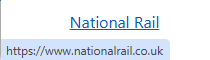
But if the text said “Famous High Street Bank login” but the actual address was https://famoushighstreetbank.example.com then hopefully you can see this is an example of a deceptive subdomain as the main domain is example.com - unrelated to this hypothetical famous bank.
Because people may forget to check these kind of popup status bar/box indicators of the real address folks should not use links in emails or random webpages to reach key services like banking, email, or government websites. Instead people should only log into key services via going to a trusted site - on reaching the correct login page they can bookmark the correct address in Chrome or whatever browser they use so they can find the trusted address without having to remember or type the address in each time - instead just tap the browser bookmark.
Security risks
Things to watch out for:
- Deceptive subdomains - this is the most likely threat, the scammer relies on people not being adequately educated to read a domain from right to left and puts a deceptive subdomain at the start so the uneducated think there is a relationship to a trusted organisation or person.
- Deceptive spelling variations - this type of deception might take a trusted domain name and add a short word or a hyphen or mispelt a word slightly. this would rely on someone being in a hurry and thinking the domain looks right and not catching the spelling error.
- Deceptive use of other alphabets - this USA Today article on deceptive use of Cyrillic characters in domains talks about the issue - which is much harder to catch if a good visual match to the trusted domain is obtained. This is why paying attention to other signals is important. Such signals might be the use of urgency or scarcity as talked about in the UK National Cyber Security Centre advice on how to spot scam messages or the use of a generic standin phrase like “Dear Customer” or “Dear User” in place your name or username in an email where you would expect to be addressed by name or username.
Summing up: spot mismatch between actual email and display name, spot use of deceptive subdomains or mispelled domains
- an easy way to be sure an email is 100% spam is a blatant mismatch between the display name - and the actual email address and the domain in it that one can often see if one hover over the email in your webmail inbox. A prestigious company supposedly using a free email service or a domain nothing like their usual domain to contact you is a strong indicator of a spam/scam email.
- Knowing that domains in website addresses are read
How to find the correct domain: search engine (not a chatbot), Wikipedia, prior trusted emails or official correspondence, trusted websites (e.g. gov.uk)
After all this talk about how to read a domain - and spotting a deceptive or incorrect one - it may be worth covering sources worth trusting for the correct version of a domain name.
- Search - not a chatbot - is the means most available and easiest for people. If you put a well known company name into a search engine there should be links to the official website high on the first page. It is possible to game this - getting a dodgy website onto the first page of the search results. But if you search for the company name which you know is correct - not the domain you are trying to check and that might be dodgy - search engines generally will use lots of metrics or indicators to check they are putting the most relevant and trustworthy results on the first page. Major search engine results should be updated regularly - unlike a chatbot; where the freshness of the underlying information and the frequency of updates may not be know & the chatbot can hallucinate or fabricate a result.
- Wikipedia. Unlike Wikipedia in its first few years; the Wikipedia of the 2020s has both human editors and things like page protections which mean that if an official website is given for a major company or public figure it is likely to be trustworthy and either the company or person’s page is protected from a vandal altering the page or the page may be corrected fairly quickly if the page is vandalised with a fake address.
- If you are looking for the domain of a company you have interacted with before e.g. you registered with them or bought something off them then a prior email or maybe even a physical letter or delivery note in the post - prior to whatever incident/message that prompts you to check the correct domain - may have their website domain.
- Finally one can start at a trusted website: e.g. https://gov.uk or https://usa.gov are starting pages for finding government services in the UK or US respectively and would find the official domain for a government body. Likewise if you started at the global site of a multinational that site would guide you to the website domain used for any local subsidiary of the multinational.
One should not confuse a trusted domain with trusted information. https://find-and-update.company-information.service.gov.uk/ is the official domain for searching the Companies House records in the UK. But for much of the last 20 years, since 2006, Companies House has had no powers or remit to check those records - this resulted in the ridiculous situation of a touted first prosecution of someone for filing false information with Companies House - seen in this 2018 press release - yet if one digs into who is being prosecuted it is Kevin Brewer who did a false filing and then talked about the issue in the national papers five years earlier to draw attention to the problem of Companies House not doing basic verification and was prosecuted re: doing the same thing a few years after the initial stunt when the government had failed to fix the issue - it would take 10yrs from Kevin Brewer’s initial stunt until the Economic Crime and Transparency Act became a government bill bringing some reforms finally (regarding the 2nd stunt it is not very credible that Mr Brewer, if he had dishonourable intentions, would do the same thing again and link it to his main Companies House profile as seen on this officers page for Cleverly Clogs Ltd which AccountingWEB reports as the 2nd company used by Brewer to highlight the issue). Companies House at least currently notes that it does not verify the accuracy of information filed with it (but finally in 2026 they are starting to bring in identity checks for directors so one can have some assurance there is an actual person with a verified matching identity for each Companies House director entry - though this alone may not deal with people acting as puppets for those with real control). The same issue of a trusted domain but not trusted information may apply to things like the content of the US Centers for Disease Control website under the tenure of RFK Jr. in the current US government.
It is important to make that distinction and see if the specific bit of information (which may be be trustworthy) agrees or disagrees with what other trustworthy sources may say. Strategies for rapidly factchecking information in a world with the internet available - such as SIFT and Lateral Reading emphasise checking the source and the information with other trusted sources. One checks the source - not just the information - because seeing what other say about the source can inform you of known biases and specific info to check (as seen in the well known Lateral Reading paper where understanding one source was a homophobic splinter group enabled a closer reading of their material for subtle biases).